A logical connection says that one service calls another. Where that call goes can depend on where the caller runs. Two services might communicate directly inside one cluster, while the same call from another environment passes through a gateway. In 3.1.x, the rules for drawing those paths lived on individual infrastructure components. On models spanning many environments, it was hard to tell which path a connection was meant to take.
Archinsight 3.2.0 makes that choice explicit. An environment can now define a named route such as publicInbound or clusterLocal. A team selects the route on a logical connection, and the deployment diagram shows the hops defined for that environment. Several connections can reuse the same route.
Breaking change for 3.1.x models
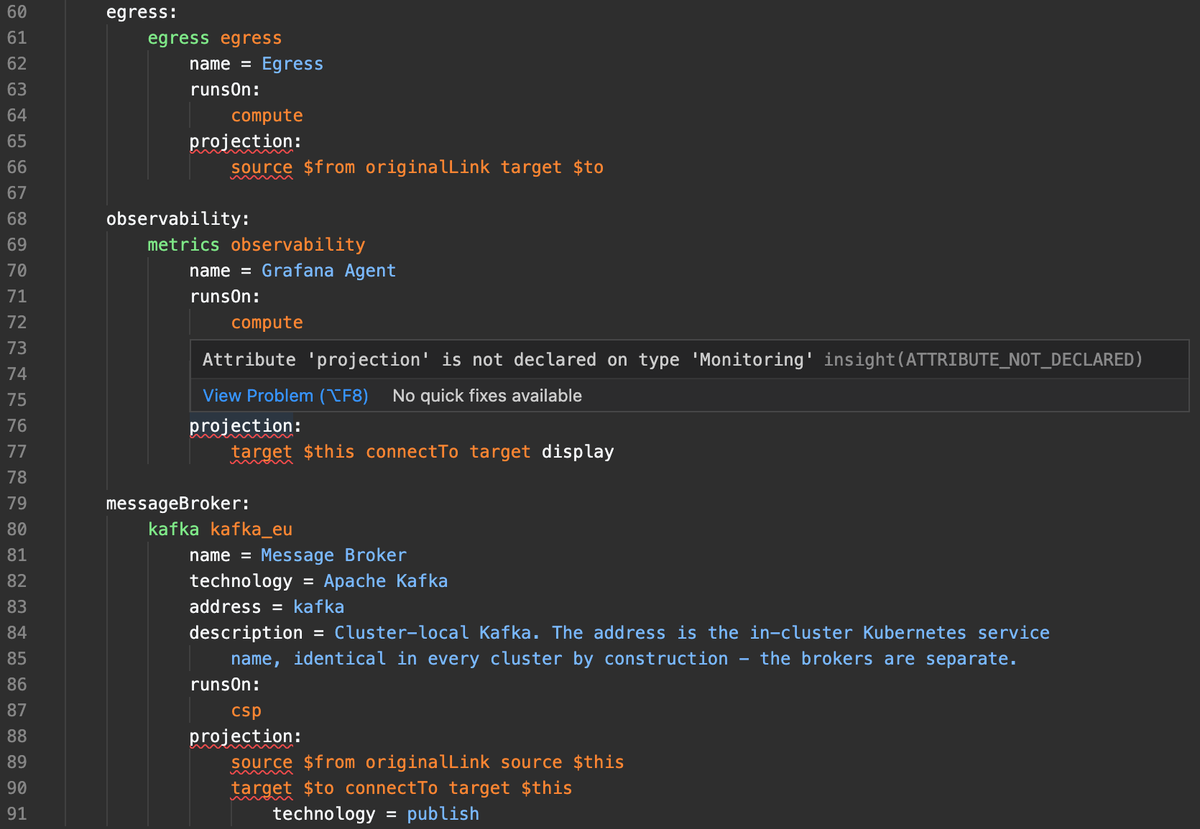
Existing models that use the old deployment syntax need a migration when moving to 3.2.x. One common symptom is a TYPE_MISMATCH error on uses inside a connection’s deployment block. A deployment diagram may also be missing an expected connection.
How to migrate
For a connection that previously used uses publicGateway, change the selection to route publicInbound. Then declare publicInbound in the environment file and move the gateway’s path rules there. For example, an incoming HTTPS call that reaches the API through a gateway can use this route:
route publicInbound
    inbound:
        $from originalLink gateway
        gateway connectTo $to
            technology = HTTPS
For infrastructure that a service uses directly, such as a database, keep uses database on the service or deployment profile. On the database itself, change projection: to route:. When migrating either kind of path, review the old source and target qualifiers and make any cross-environment hops explicit.
Run archinsight link ., then check the deployment diagrams for the affected environments. Verify that each connection reaches the intended destination through the expected gateways or brokers. Migration guide with before-and-after examples
The Archinsight agent skill shipped with CLI 3.2.x includes a dedicated migration guide. If your project has a skill generated by an older CLI, refresh it before asking your agent to migrate the model. The guide covers gateways, databases, Kafka subscriptions and cross-environment calls, including how to verify that the migrated paths preserve their original direction and labels.